


The secret to a seamless screen network lives in the details: How the screens are zoned, what the content is doing, how often it changes, and what message it communicates with the person walking past.
The eight examples below are some of our favorite illustrations of what good signage actually does, across a wide range of industries and budgets. Whatever your size, you can run a smaller version of any of them with a single screen and a 14-day free trial.
1. Time Warner Cable's Digital-Heavy Flagship Store
The Flagship Experience Store in Columbus Circle was the first time most New Yorkers walked into a "store" that was more screen than shelf. A five-screen video wall in the lobby. Interactive product demos at every station. A digital fireplace, because why not. Twenty-one-inch tablets along the walls for self-guided product education.
What made it work was not the wall count. It was the way the screens divided the space into purposes. The lobby wall sold the brand. The mid-floor displays sold features. The tablets handled the boring how-do-I-set-this-up questions a sales associate would have answered the slow way.
.avif)
You can copy this on any scale. Three TVs in the right places run the same logic. With OptiSigns you can build a video wall from off-the-shelf displays, zone the rest of the room, and run the whole thing from one dashboard.
2. Bradley International Airport, Connecticut
Bradley International Airport's terminal mural is one of the more interesting recent deployments because it does not use a single LED panel. The 55-foot-wide canvas is built from four edge-blended EPSON laser projectors stitched into a continuous 16K-wide image, all driven by a single OptiSigns ProMax player with 8K output.
.avif)
What makes this wall worth copying? For a wall this wide, projection is dramatically cheaper than direct-view LED and easier to repair (swap a projector instead of a panel array). Edge-blending makes the seams invisible, so visually it reads as one seamless wall.
The second is the content play. Instead of a generic ad reel, the wall runs locally-themed illustrated postcards of Hartford, Windham County, and other Connecticut destinations. It feels like a greeting, not a billboard. That is the difference between an airport "screen" and an airport "experience."
The same logic scales to a hotel lobby, a corporate atrium, or a venue concourse. One ProMax player can drive an 8K canvas across a wall of any geometry, projector or LED, without a separate render pipeline.
3. Ice Cream Labs
Ice Cream Labs broke through in nitrogen ice cream and stayed visible by turning their screens into a feedback loop with social. Tagged customer posts, replies, photo features, promo strips. Customers had a reason to look at the screen, and a reason to post again later.
.avif)
The same play works for any food business with a steady Instagram audience. A live social feed pulled into one panel of a menu board updates itself every shift, costs nothing extra to produce, and quietly nudges customers to post. Free creative, generated by the people you most want walking back through the door.
OptiSigns has a Social Media Walls app that pulls from Instagram, X, TikTok, or a hashtag and drops it on a screen alongside your menu, your specials, or your queue board.
4. American Junkie
This business is one of the most popular sports bars in California and Arizona. American Junkie's screens earn their keep because each one is doing different work. A bar with twelve TVs all running the same game is just twelve copies of the same thing. The trick is using the count.
.avif)
The main screen plays the marquee game. A second runs live ESPN news feeds, while the 3rd runs drink specials that change by quarter or by game state. The screen by the door runs trivia and event posters until kickoff.
OptiSigns ships free sports feeds for the NFL, NBA, NHL, MLB, college football and basketball, Formula 1, European soccer, and the 2026 Winter Olympics. Live scores, schedules, standings, and promo strips along the bottom, scheduled to specific screens at specific times. No HDMI swapping every time someone yells "switch it to the other game."
5. Mount Ommaney Shopping Center
Mount Ommaney in Brisbane built a child-friendly LED installation that combined webcams, animation, and a light-touch AR layer so kids could "duel" pirates and swim with fish on the way past the food court. The mall posted clips of the experience to social and turned a directory into a destination.
.avif)
You do not need an AR engine to copy the play. The principle is that public-space signage works hardest when it does something with the people in front of it, not just at them. A live photo wall pulling from a venue hashtag, a wayfinding kiosk with a touch overlay, a countdown to the next event: anything that turns a passive viewer into a participant.
Interactive signage and kiosk software brings that capability down to one screen and one tablet, instead of a custom build.
The mall officials then share these experiences using their social media platforms. If you offer similar experiences, you might want to add this to your business. Remember, social media is a powerful force since around 2.2 billion people use Facebook every month.
Factor in other social media networks like YouTube and YouTube, your reach increases. Posting interesting content like this will drive more engagements to your company. Don't underestimate the power of social media for your business needs.
6. Emporium Thai
This Westwood, California business draws its customers even from far-off places. Some of these customers come from places hours away from UCLA. They go here to test their resistance against their 10 levels of spicy.
.avif)
It is easy to think about digital signage as a menu thing and stop there. The dining room itself is where a lot of the value lives. A few quiet displays can do real work: brand storytelling, slow-motion food photography, live customer posts, and the occasional promo for catering or delivery. Not every screen has to sell something directly. Some of them just have to make the room feel like a place worth posting about.
A touchless QR menu belongs in the same conversation. One QR code on a small screen, scanned with a phone, no laminated menu to wipe down between tables.
7. La Taqueria
When it comes to customer decisions, Yelp is one of the most powerful driving factors. After all, around 72% of consumers trust online reviews. That means they trust these reviews like personal recommendations.
.avif)
La Taqueria put their highest-rated reviews next to their menu. Customers reading the carnitas description also saw "best burrito in San Francisco" three feet to the right. People want to be the kind of person who picks the right thing on the menu, and a 4-star review next to the price helps them feel like they did.
This is one of the simplest plays on the list. A single panel on a menu board can rotate verified reviews, customer photos, or "as featured in" press logos. No new content production. No extra apps to learn. Just a layout decision.
OptiSigns has thousands of pre-built menu board templates that include this kind of side panel by default, so you can drop in reviews and call it done.
8. Wonder Waffle
Wonder Waffle Houston is the kind of customer story most small-business owners want to hear. Eve and Simon Stobb, the President and VP, moved from Switzerland after their daughter spent a year as an exchange student in Houston. They fell in love with the city, found a Wonder Waffle store in Bern that they wanted to bring with them, and opened their first U.S. location on August 1st.
They saw OptiSigns at a Houston trade show in July. About one month later, the screens were live alongside the waffles.
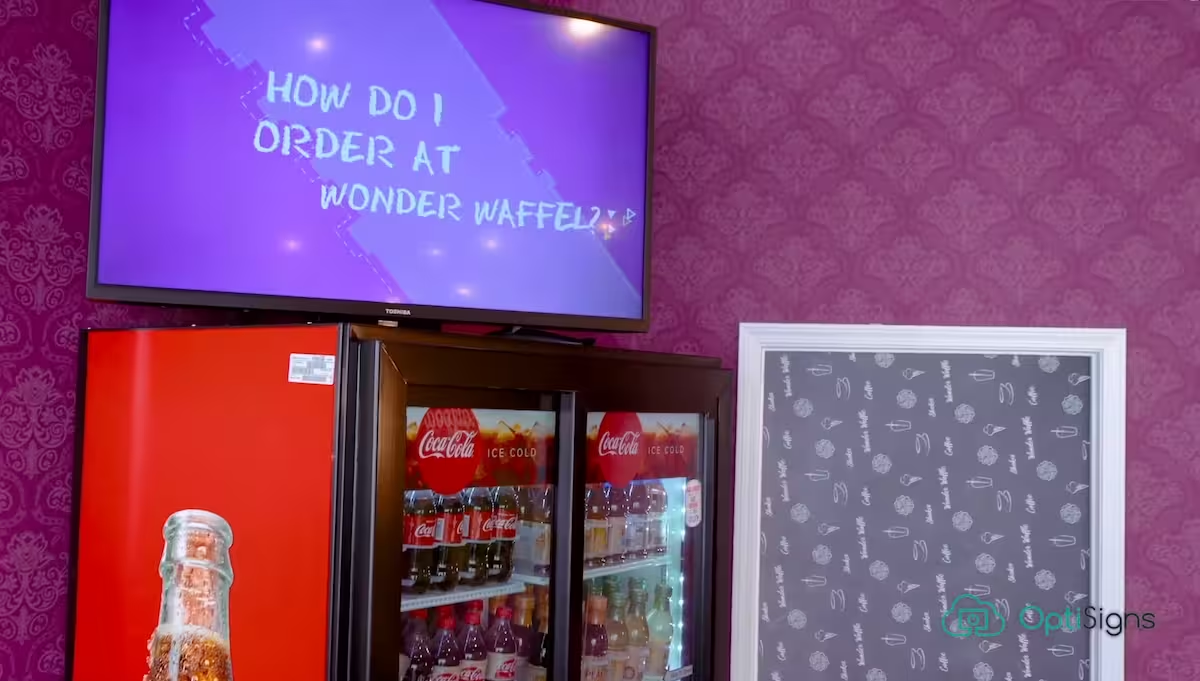
Wonder Waffle runs two kinds of screens. A video screen near the counter walks customers through how to order, which takes pressure off the staff during a rush. A colorful menu display fits the rest of the space and stays current because the team edits it themselves whenever ingredients change. "It is pretty easy to do some adjustments and switch some ingredients," Eve says. "We are more than just comfortable with this solution. We can recommend it to everyone."
One screen for the how-to-order video. One screen for a menu the staff can edit without a designer. Both managed from a drag-and-drop dashboard and visible alongside other OptiSigns customer stories.
9. MedEX
Pharmacy has been serving Pearland, Texas for over 11 years. Director of Sales Jackie Singleton runs OptiSigns on both sides of the counter, and the screens earn their keep in two completely different ways.

In the waiting area, the displays loop patient education on common disease states alongside weather and local news, all curated for the pharmacy's actual patient base.
Behind the counter, back-office screens track incoming faxes and phone calls in real time and triggers an alert whenever a customer has been waiting longer than three to five minutes.
This kind of setup makes healthcare signage worth the investment. The front of house lifts patient experience and quietly reduces pharmacist consult load. The back of house turns operational data into a glance, so techs catch a slow ticket before a customer notices it themselves.
The Strategies Behind Every Example
Most successful digital signage netowrks run a combination of three tactics:
- Zoning. Different screens running different content for different parts of a space.
- Sync triggers. A single piece of content firing across many screens at once for a takeover moment.
- Live feeds. Sports scores, social posts, queue data, dashboards, weather, anything pulled from a real-time source so the screens never look stale.
The other thing they share is centralized control. Whatever is running, one person can update it from one place. Without that, you do not have a digital signage network. You have a stack of TVs that all need constant monitoring.
OptiSigns is built around these three tactics, with 1,000+ pre-built templates, free apps for the live feeds, scheduling and zoning baked into the dashboard, and 24/7 support if something blanks at 8am. See pricing or start a free 14-day trial and run one of these plays on a single screen this week.


