


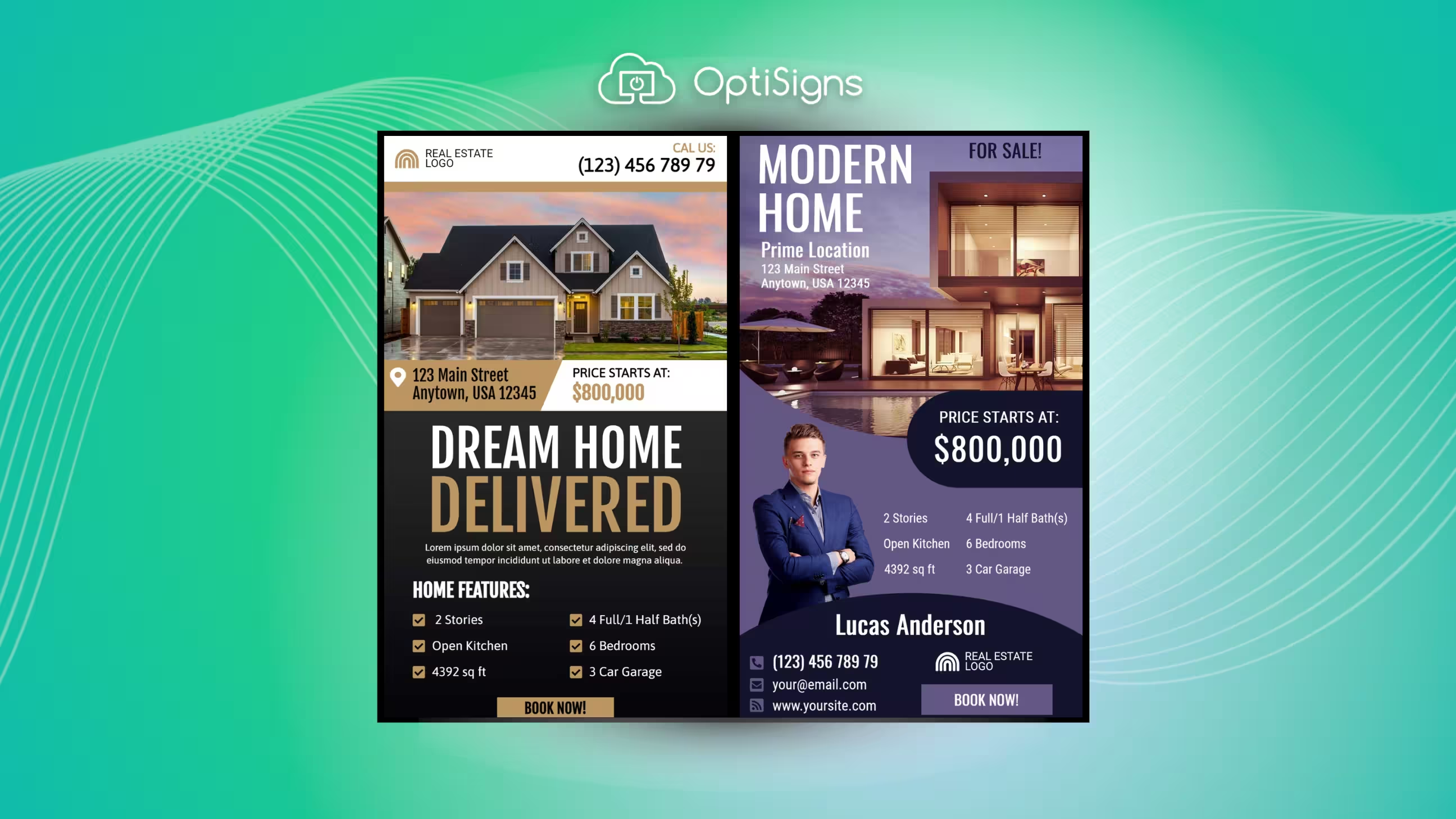
What Is Real Estate Digital Signage?
Real estate digital signage is any digital screen (in your office, storefront window, or open house) that displays rotating content like property listings, market data, testimonials, and branding. Instead of printed flyers taped to windows or static poster boards in the lobby, you're running a screen that updates in seconds from your laptop or phone.
Why does this matter? There are over 1.5 million NAR members and millions more licensed agents across the country, and most agencies look the same from the outside. A "For Sale" sign and a stack of business cards don't cut it anymore. According to the NAR 2024 Technology Survey, 75% of REALTORS now use social media in their business and 39% call it their top lead generation tool. Digital signage takes that same digital-first mindset and brings it to your physical space.
We've helped real estate agencies set up everything from single lobby screens to multi-office window display networks. Here's what actually works.
Benefits of Digital Signage for Real Estate
Before jumping into specific ideas, here's why digital signage works for real estate.
It grabs attention. Digital displays undoubtedly capture more views than static signs. That matters when your office sits on a busy street and every passing car or pedestrian is a potential client. A bright, moving screen draws the eye in ways a printed poster simply can't match.
Brand recall jumps. Industry studies suggest digital signage achieves roughly twice the recall rate of traditional print media. When someone walks past your window display showing a beautifully staged listing, they're far more likely to remember your agency name the next day. For a full breakdown, see our guide on the benefits of digital signage.
You also get real-time updates. Sold a listing at 2pm? Update the screen by 2:05. New price reduction? Change it remotely from your phone. With printed materials, you're waiting days for a reprint and paying for it every time.
The cost math works out. There is an upfront hardware cost, but you pay it once. Compare that to monthly print bills for window cards, flyers, brochures, and mailers that go straight to the recycling bin.
Research also suggests a majority of consumers who encounter digital signage are influenced in their purchasing decisions. In a business where trust and first impressions drive everything, that influence matters.
One caveat worth noting: digital signage won't help if your content is stale. Agencies that get the most out of it commit to updating their screens often.
10 Real Estate Digital Signage Ideas
Here are ten practical ways to use digital signage in your agency. Not vague concepts, but things you can set up this week.
1. Property Listing Slideshows
This is the most obvious use, and it works. Set up an auto-rotating slideshow of your active listings with price, beds/baths, square footage, and a neighborhood photo. Update it in minutes when listings change status.
The key here is video: an Australian property portal study found listings with video received 403% more inquiries than photos alone. Even a simple slideshow with transitions outperforms a static printed card in the window.
One thing we see agencies get wrong: cramming 40+ listings into one rotation so stick to your 8-10 best options. Viewers won't watch long enough for more.
2. Community Events and Neighborhood Info
Buyers are always interested to know what their potential new community offers. Display local school ratings, park locations, transit options, and upcoming community events on your screens. This positions your agency as the local expert, not just another sales office. Pull content from the city's event calendar or local chamber of commerce and rotate it alongside your listings.
3. Client Testimonials and Social Proof
Short video testimonials from happy clients, playing on a loop in your lobby or window, build credibility before a prospect even walks through the door. Keep them under 30 seconds each. A real person saying "They found us exactly what we wanted" is worth more than any marketing copy.
4. Social Media Walls
Pull your Instagram feed, Facebook posts, and Google reviews directly onto your screens. This creates a live, constantly updating display that shows your agency is active and engaged. It also gives clients social proof without you having to curate it manually. Learn how to set this up in our guide on social media walls.
5. Mortgage Rates and Market Data
Display current mortgage rate feeds and local market stats: median home prices, days on market, inventory levels. This turns your office window into a resource that people actually stop to read.
Agents who share market data position themselves as advisors, not salespeople. Update rates daily or tie into a live data feed.
6. Virtual Tours and Video Walkthroughs
Despite 52% of agents now using drone photography and video tools (NAR Technology Survey, 2024), many still underutilize video in their listing marketing. A significant share of home buyers turn to YouTube during their property search, and your office screens are a natural place to showcase walkthrough highlights.
7. Team Introductions
Put faces to names. Display short bio cards or intro videos for each agent showing their specialties, neighborhoods they cover, and years of experience. Clients walking into an office feel more comfortable when they've already "met" someone on screen. It's a small touch that personalizes the experience before the first handshake.
8. Open House On-Site Displays
Bring a portable screen to your open houses. Show floor plans, neighborhood data, school information, and financing options. Most agents show up with printed flyers. You show up with a screen that plays a walkthrough video and displays the local comparables.
Tip: mount the screen near the entrance, not buried in a back room. We've seen agents tuck these in a corner where nobody looks.
9. Office Dashboards and Leaderboards
Not everything on your screens has to be client-facing. Internal dashboards showing sales goals, new listings, and closing stats motivate agents and create competitive energy. When clients visit your office and see a team hitting targets, it reinforces that they're working with a productive agency.
10. QR Codes for Lead Capture
Display QR codes that link to virtual tours, contact forms, or detailed property pages. Place them on window displays so after-hours foot traffic can still engage with your listings. A passerby scans, lands on a listing page, submits their email. That's a lead you wouldn't have gotten otherwise. Check out how to add QR codes to your signage.
Beyond the Office: Where to Place Real Estate Digital Signs
Your office lobby isn't the only spot that works. Think about where your audience actually is.
Window displays. This is the highest-impact placement for most agencies. A high-brightness screen (700+ nits) stays visible in direct sunlight and works 24/7, catching foot traffic and drive-by attention even after hours. Research indicates roughly 76% of consumers have been drawn into a store by an eye-catching digital display. For window-facing setups, brightness matters. Standard TVs wash out in daylight. If your screen faces the elements, here are tips on protecting outdoor displays.
Fair warning: mounting behind glass cuts brightness further. Budget for a screen rated higher than you think you need.
Lobby and waiting areas. Clients sitting in your office before a meeting are a captive audience. Show listing slideshows, client testimonials, and market data. It fills wait time with useful content and reinforces your brand.
Open houses. A portable screen on a stand running floor plans, neighborhood highlights, and financing info turns a casual viewing into something memorable. Most agents skip this entirely, so it's an easy way to stand out.
New development sales centers. If you're marketing a new build or condo project, digital signage handles floor plan comparisons, amenity tours, and construction timeline updates better than any printed brochure.
Commercial properties. For commercial real estate, digital signage doubles as a functional tool: tenant directories, leasing availability, wayfinding, and building info for prospects touring the space.
Hardware and Setup: What You Need
You don't need a massive budget or an IT team. Here's what goes into a basic setup.
Screens. Any commercial display or smart TV works for indoor use. For window displays, you need a high-brightness screen rated at 700+ nits minimum. (Nits measure screen brightness. A typical home TV runs 300-400 nits, which washes out behind glass in sunlight.) If you're starting small, a smart TV for digital signage is the most affordable entry point.
The most common mistake we see? Buying a consumer TV for a window-facing setup. It looks fine on day one and washes out the first sunny morning.
Media player. Think of this as a tiny computer dedicated to running your signage content. It plugs into your screen's HDMI port. Options start around $80 and go up depending on features. You can compare OptiSigns players to find the right fit, or browse hardware options directly.
Software. A cloud-based content management system lets you control what's on every screen from any browser. Upload images, schedule playlists, push updates remotely. No USB drives or manual file transfers.
What it costs. A basic single-screen setup runs $300-500 total for the screen, player, and software. Compare that to what many agencies spend on printed materials: $200-400 per month on window cards, brochures, flyers, and poster reprints. Over 12 months, a $400 digital setup replaces $2,400-4,800 in print costs, and the content stays fresh. You can change it in seconds instead of waiting days for a reprint. For a detailed breakdown, see our digital signage cost guide. You can also review the full list of digital signage components to understand what each piece does.
Content Strategy and Design Tips
Having a screen is step one. What you put on it determines whether it works.
Rotate content every 10-15 seconds for window displays. We've tested rotation speeds across hundreds of deployments, and this is the sweet spot. Shorter feels frantic, longer loses people. Lobby screens can run longer segments since people are seated.
Keep text large and readable from 6+ feet away. If someone across the street can't read your listing price, the screen isn't doing its job. Stick to a few key data points per slide (price, location, beds/baths) and let the photo do the rest.
Use your brand colors, fonts, and logo consistently. Every screen is a branding opportunity. Consistency across your window display, lobby screen, and open house setup builds recognition.
Schedule content by time of day. Morning foot traffic might respond to mortgage rates and market data. Evening passersby are browsing, so show your best listing photos and video walkthroughs. Most CMS platforms support time-based scheduling.
Use templates. You don't need a graphic designer. Tools like Canva integration let you create professional slides in minutes. For more ideas, our content creation guide covers design fundamentals.
Update listings weekly at minimum. Nothing kills credibility faster than a "Just Listed" sign for a property that sold three weeks ago. Set a weekly content review cadence, or better yet, automate it. Here's guidance on how often to refresh your content.
Measuring ROI
You've invested in screens and software. How do you know it's working?
Track QR code scans per listing. Most QR code generators include analytics. Compare scan volume across listings to see what content gets engagement.
Monitor foot traffic changes. If you installed a window display, are more people walking in? Track walk-in inquiries before and after your install. Even a simple tally sheet at the front desk works.
Compare monthly print costs. An agency spending $300/month on printed materials saves $3,600+ per year after switching to digital, and gets content they can update on the fly instead of static paper.
Survey clients. Add "How did you hear about us?" to your intake form. Track how many mention seeing your window display or scanning a QR code.
Monitor listing inquiry sources. If your QR codes link to specific landing pages, you can attribute leads directly to your signage. That gives you a clear cost-per-lead number to compare against other marketing channels.
How to Get Started with OptiSigns
If you want to try this without a big commitment, here's the simplest path:
Choose your screen. Use an existing TV in your office, or pick up a commercial display for a window setup. Any screen with an HDMI input works.
Connect a media player. Plug in an OptiSigns player or any compatible device (Amazon Fire TV Stick, Android TV, etc.). It connects to WiFi and pulls content from the cloud.
Upload your content. Add your listing photos, videos, and branding. Or start with pre-built templates from the template library. There are layouts designed for real estate listings, team bios, and testimonials.
Schedule and manage remotely. Set up playlists, schedule content by time of day, and push updates from any browser. If you have multiple offices, manage all screens from one dashboard.


