



The global interactive whiteboard (IWB) market hit $4.8 billion in 2024, and according to Grand View Research, it's on track to nearly double by 2030.
Schools have historically driven most of that growth—they still account for 68% of installations. But corporate adoption is now accelerating even faster, growing at 8.5% annually as more companies recognize that hybrid meetings work better with the right tools.
Whether you're outfitting a classroom, upgrading your conference rooms, or exploring options for the first time, this guide will help you understand how the technology works, which features deliver real value, and how to make a confident decision.
What Is an Interactive Digital Whiteboard?
Think of an IWB as a large tablet designed for team collaboration. You can write on it, annotate documents, run applications, and videoconference—all from a single screen.
The core components include:
Display pane: Typically 32" to 50"
Touch layer: Detects fingers, styluses, or both
Computing unit: Built-in or connected externally
Software: For whiteboarding, annotations, and integrations
Most modern units are all-in-one systems. Older setups that used a projector with a touch-sensitive surface are still around, though they're increasingly being replaced by newer technology.
How the Touch Technology Works
The technology behind the touch layer affects responsiveness, accuracy, and how many people can interact with the board at the same time.
Infrared (IR) is the most common technology for large displays. LEDs around the frame create an invisible grid of light, and when you touch the screen, the system detects where the beams are interrupted. It works with fingers, styluses, or even gloved hands. The main consideration is that very bright ambient light can sometimes cause interference.
Capacitive technology is similar to what's in your smartphone. The screen detects the electrical charge from your skin, providing excellent accuracy and gesture support. It does require skin contact or compatible styluses and tends to cost more at larger sizes.
Resistive technology uses pressure-sensitive layers. While more affordable, it's less accurate and less durable, which is why it's being phased out in favor of newer options.
In day-to-day use, responsiveness often matters more than the specific technology. A display that responds instantly to touch feels natural and intuitive, which encourages people to actually use it.
Touch points are worth checking too. If you anticipate multiple people collaborating at the board during brainstorming sessions, this spec becomes important.
What Changes Compared to Traditional Whiteboards?
The shift from dry-erase markers to digital transforms how teams capture and share ideas.
With a traditional whiteboard, someone usually snaps a photo before erasing—and that photo often gets buried in a folder. With an interactive whiteboard, brainstorming sessions can save automatically to the cloud.
Essentially, the ability to save, share, and revisit your work is often the most valuable aspect of going digital.
Features Worth Paying For
Not all interactive whiteboards are created equal. Here's what separates the tools people love from the ones that don't get used.
Screen Size
It's tempting to go as big as possible, but consider your space. In a smaller room, a very large screen can actually be harder to use since people up front may need to step back to see everything.
Platform Integration
This is one of the most important factors to get right.
Your interactive whiteboard should work seamlessly with the tools your organization already uses. If you're a Microsoft 365 shop, look for strong integration with Teams, OneDrive, and Outlook calendars. Google Workspace users will want native support for Meet, Drive, and Google Calendar.
A few things worth verifying during your evaluation:
- Cloud storage synchronization
- Single sign-on (SSO) support
- Room calendar display for booking
If you're managing displays across multiple rooms or locations, digital signage platforms can help. OptiSigns lets you control content across conference rooms, lobbies, and common areas from a single dashboard—helpful when you're coordinating more than just one or two screens.
Whiteboarding Hardware And Software
The quality of bundled software varies quite a bit.
Good whiteboarding software offers low-latency writing, easy PDF and image imports, automatic saving, and simple sharing options. Less capable software can feel sluggish or limited in what you can export.
Truthfully, most organizations don’t just need a whiteboard. They need an interactive screen that can do more than one job—collaboration in the morning, dashboards at lunch, and wayfinding or announcements later in the day.
That’s where OptiKiosks shine. OptiKiosks combine commercial-grade interactive touchscreen hardware with OptiSigns software, designed not as a whiteboard replacement but as a versatile platform for deploying interactive experiences, rotating content, scheduling room or lobby messaging, and managing everything remotely from one dashboard.
Business Use Cases
Interactive whiteboards are useful in various scenarious. Here's where organizations see the most value.
Training and Onboarding
Some Interactive displays let trainers annotate directly over slides, record sessions for team members who couldn't attend, and engage participants with real-time activities. Auto-saving displays make it easy to share materials afterward.
For organizations that need something more tailored, use OptiDev to build custom training modules and onboarding flows without writing code.
Meeting Rooms
Hybrid meetings present a common challenge: remote participants can't see what's being drawn on a physical whiteboard, and sharing laptop screens can be clunky.
Interactive displays solve both problems. Remote attendees see the whiteboard through the video call, in-room participants can wirelessly share their screens, and everyone can annotate on the same canvas. Some displays even support screen mirroring from multiple devices simultaneously.
Looking for a complete meeting room digital signage solution? The right setup combines interactive capability with room scheduling and content management.
Brainstorming and Ideation
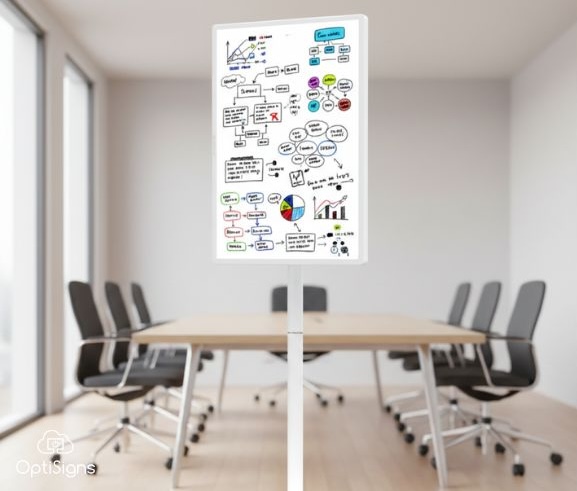
For visual thinking and collaborative problem-solving, interactive screens remain one of the best tools available. Digital versions add helpful capabilities like, onboarding guides, infinite canvas space, built-in templates, moveable sticky notes, and voting features.
Lobbies and Common Areas
Beyond meeting rooms, interactive screens work well as wayfinding kiosks, visitor check-in stations, employee directories, and event schedules.
For these applications, purpose-built kiosk solutions often work better than repurposing whiteboard hardware. OptiSigns offers interactive digital signage kiosks designed for 24/7 commercial use, combining durable touchscreen hardware with intuitive content management.
For more customized needs, OptiDev.ai is OptiSigns' no-code platform for building custom kiosk and web applications. You can create visitor check-in flows tailored to your process, product catalogs with your specific filters, or interactive wayfinding for your building—all without writing code.
Education Use Cases
Schools were early adopters of interactive whiteboards for good reason, and education still represents the majority of installations.
Engagement: Dynamic, interactive content captures student attention more effectively than static presentations. Teachers can seamlessly incorporate videos, simulations, and hands-on activities into their lessons.
Differentiated instruction: The same lesson can offer multiple pathways—visual, auditory, and kinesthetic—to reach students with different learning styles.
Collaboration: Multiple students can work at the board simultaneously, making group problem-solving visible to the entire class.
Documentation: Lesson annotations save automatically, so absent students can review what they missed, and teachers can refine their materials over time rather than starting from scratch.
For classrooms, 65" and 75" displays are the most popular sizes—large enough for visibility from the back of the room, but manageable for installation. Learn more about digital signage for education.
Understanding the Costs
Interactive whiteboard pricing covers a wide range:
Keep in mind that the purchase price typically represents 60-70% of the total five-year cost. You'll also want to budget for:
- Installation (mounting, cabling, and potentially electrical work)
- Software licensing (some vendors charge annual fees)
- Accessories (styluses, stands, wall mounts)
- Support and maintenance contracts
An alternative approach: Some organizations opt for commercial touchscreen displays ($2,000-$4,000 for a 75" model) paired with flexible digital signage software. This combination provides touchscreen interactivity for use cases like scheduling, dashboards, announcements, and content rotation — though it's not designed to replicate the specialized collaboration features of a dedicated whiteboard, such as infinite canvas or digital sticky notes.
The trade-off is that dedicated whiteboard hardware typically offers more refined stylus performance and specialized collaboration features like infinite canvas and real-time co-authoring. The flexible approach provides more versatility for signage, kiosk, and display use cases, often at a lower total cost.
Common Challenges and How to Avoid Them
A few issues come up repeatedly with interactive whiteboard deployments. Here's how to address them proactively.
Calibration Drift
Over time, the touch layer can lose alignment with the display, causing the cursor to appear slightly off from where you're touching.
How to prevent it: Plan for quarterly recalibration. Keep screens clean, since dust and smudges can affect some touch technologies.
Software Changes
Google discontinued its Jamboard service on December 31, 2024, requiring users to migrate their content to other platforms. While this kind of change doesn't happen often, it's worth considering.
How to prepare: Look for vendors with established track records and sustainable business models. Verify that you can export your data in standard formats. Consider hardware that works with multiple software platforms.
Adoption Challenges
Even great technology only delivers value when people actually use it. Sometimes organizations invest in interactive displays that don't get utilized as much as expected.
How to encourage adoption: Include training in your rollout plan. Identify enthusiastic early adopters who can champion the technology. Track usage and gather feedback so you can address any barriers quickly.
What's on the Horizon
Several trends are shaping the future of interactive displays:
AI-powered features are beginning to appear in newer displays. Expect these capabilities to become more common over the next few years.
Hybrid work is here to stay. With 63% of U.S. companies investing in collaboration tools (according to EY), displays that connect in-room and remote participants will remain essential infrastructure.
Categories are converging. The same screen that hosts a whiteboarding session in the morning might display company announcements at lunch and wayfinding information in the evening. The distinction between "interactive whiteboard" and "digital signage” continues to blur.
Prices are becoming more accessible. The sub-$3,000 category has expanded significantly, making interactive displays viable for smaller organizations and more use cases.
Making Your Decision
Start by identifying your specific needs.
Consider: What problems are you trying to solve? How many rooms need displays? What technology does your organization already use? Who needs to collaborate with whom, and where are they located?
Then match your requirements to the right solution:
- Heavy Microsoft 365 usage → prioritize strong Teams integration
- Google Workspace environment → look for native Meet and Drive support
- Multiple locations to manage → consider commercial displays with flexible signage software
- Large-scale deployment → focus on total cost of ownership, not just unit price
Request demos from your shortlist, and include the people who will actually use the displays day-to-day—not just IT staff. Their feedback on whether the interface feels intuitive will be invaluable.
Interactive whiteboards can transform how teams collaborate and communicate. With some upfront planning to match the right solution to your needs, you'll be well-positioned to get real value from your investment.


