


When people walk by your digital screen, you only have a few seconds to grab their attention. What’s on that screen decides whether they stop to look or keep walking.
Digital signage is more than just displaying words or pictures. It’s about sending the right message in a way that’s clear and eye-catching. Good digital signage content makes people stop, notice, and take action.
The digital signage industry is growing quickly. In 2024, MarketsandMarkets reported the global digital signage market was valued at $20.1 billion. This strong demand proves its effectiveness when used with great content.
This guide will show you how to make digital signage content that works. Whether you’re new to it or just want better results, you’ll see how simple it is to design content that stands out.
Main Takeaways
- Digital signs work best when the message is quick and clear enough to understand in just a few seconds.
- Pick the right type of content—like a picture, video, or live update—for the people who will see it the most.
- OptiSigns’ easy-to-use tools and ready-made templates empower anyone to design good content.
- Schedule content ahead of time to make sure screens are always fresh and timely.
- OptiSigns brings everything together: design, schedule, and connect apps all in one place.
Understanding Digital Signage Content Creation
According to a 2025 Market.us report, shoppers are 80% more likely to enter a store with screens. And 84% of retailers say digital signage boosts brand awareness better than print ads. This makes them a great tool for many kinds of businesses. But the key to success is having the right content.
Digital signage content creation makes pictures, words, and media for digital screens. Good content grabs attention fast and explains the message clearly. It inspires those who see it to take a specific action. This can be visiting a store, scanning a QR code, or following directions.
Unlike websites or print flyers, digital signage only has a few seconds to make an impact. People usually glance at screens for 2–3 seconds as they walk by. That’s why content must be simple, bold, and easy to read.
Strong content uses bright visuals, short text, and a clear design that fits with the screen’s location.
Key Components
Effective digital signage content includes:
- Clear, high-quality images
- Short videos that catch attention
- Easy-to-read text with a clear order
- Light animations that guide the eye
- Real-time feeds like weather, social media, or news updates
- Interactive tools such as touchscreens or QR codes
- Templates that keep branding consistent
Common Challenges
The primary challenges of using digital signage are:
- Designing for short consumer attention spans
- Lacking the design skills or tools to make content look professional
- Keeping screens fresh with new updates
- Making content work on different screen sizes and layouts
- Tracking which content works best
- Providing the necessary information while keeping it easy to read
- Making sure all screens follow the same branding style
- Understanding which messages perform best in different locations
Luckily, modern platforms like OptiSigns can help you overcome these challenges.
7 Steps To Create Effective Digital Signage Content
Creating digital signage content is easy when you follow a plan. These steps cover everything from understanding your audience to scheduling your screens.
1. Define Your Audience and Goals
Start by asking two simple questions:
- Who will look at your screens?
- What do you want them to do?
Different people need different content. Kids and younger shoppers may prefer bright pictures and touchscreens. Older people may want clear text and simple maps.
Determine what you want people to do after seeing your digital sign. Do you want them to buy something, learn something, or find their way around? Pick one main goal at a time so it’s easy to measure if it works.
Examples of goals by location:
- Stores: Show sales, promote new items, move people to quiet areas, or make waiting time feel shorter
- Offices: Share company news, celebrate employees, or remind people about safety rules
- Restaurants: Show menus with pictures, promote specials, or tell people about rewards programs
Good goals are SMART:
- Simple
- Measurable
- Achievable
- Relevant
- Time-based
When goals are clear, you can better track whether or not your content is effective.
2. Plan Your Message
Once you know your audience and goals, decide what you want to say. Keep your message short and clear. People only look at screens for a few seconds, so they should understand your message right away.
Good content combines simple words and strong visuals. It’s widely believed that people remember 65% more information when it includes both text and pictures.
Always add a call-to-action (CTA). This tells people what you want them to do next. Use action words like “visit,” “save,” or “join.” CTAs work best when they’re clear and direct.
Here are a few examples:
- Visit our website!
- Ask about today’s special offer.
- Scan this QR code.
- Follow us on social media.
You can also create urgency by showing that an offer is limited to a short time. For example, “Save today only!” or “Offer ends soon.” This pushes people to act right away.
3. Choose Your Tools
Now that you know your audience, goals, and message, it’s time to pick the tools you’ll use to make your content. The tools you choose will depend on your skills and goals.
If you’re new, start with easy tools that have ready-made templates. These let you drag and drop pictures, text, and icons, so you don’t need design experience. You can make professional-looking slides or ads in minutes.
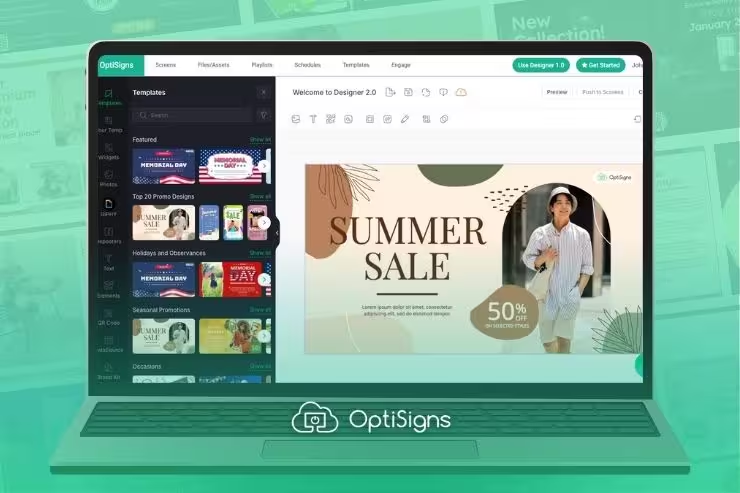
OptiSigns offers thousands of pre-built templates you can easily edit. This makes for a quick, low-stress process, even for those with no design experience.
4. Apply Basic Design Principles
Good design makes your screens easy to read and nice to look at. Even small changes can make a big difference.
Try these tips:
- Use large fonts that can be seen from far away.
- Pick high-contrast colors, like dark text on a light background.
- Leave space around words and pictures so the screen doesn’t look crowded.
- Keep a consistent style across all screens so everything feels connected.
Limit each screen to one main message with a short headline (3–7 words). A simple design helps visitors understand the message in just a few seconds.
5. Choose the Right Content Types
Different screens need different types of content. What you choose depends on your goals and where the screen is located. For example:
- Static images are best for simple messages like store hours, menus, or branding. They’re quick to make and load up.
- Videos grab attention with movement and tell a bigger story. Keep them short (15–30 seconds) for busy areas, and up to 60 seconds in waiting areas.
- Live feeds like social media, news, and weather keep content fresh.
- Interactive tools, like touchscreens and QR codes, encourage people to explore more. This can increase retention, but keep sessions under 90 seconds to prevent lines.
Carefully consider the location. Think about distance, lighting, and what people are doing when they see it. For example:
- Busy areas: People only glance for a second. Use bold text and simple images that can be understood quickly.
- Waiting areas: Longer videos, live feeds, and rotating slides help wait times feel shorter.
- Lighting: Bright spots need high-contrast colors and simple visuals. Dimmer areas can handle softer visual designs.
6. Optimize for Context
Match the digital signage content to the screen location. Also consider how your goal fits with what people are doing. For instance:
- A screen at the front of the mall should welcome visitors and help them find their way.
- Screens near checkout areas work best for sales, upsells, or loyalty programs. This is because shoppers are ready to buy.
- In offices and breakrooms, people have more time to read. Screens can engage people with company news, safety tips, or calendars.
- A mall food court screen should show meal deals. Kids’ areas might display upcoming family events.
Think about how long people will look. Keep messages short in busy areas with lots of foot traffic. In waiting areas, stay fresh with playlists that rotate every 8–15 seconds.
7. Schedule and Publish
Once your content is ready, you need to schedule when and where it will play. Good scheduling ensures people see the right message at the right time. This may be:
- Time-based: Show breakfast menus in the morning and dinner menus in the evening.
- Day-based: Share weekday hours or weekend specials.
- Seasonal: Rotate holiday ads, summer sales, or back-to-school events.
- Event-driven: Post conference schedules, concerts, or last-minute updates.
OptiSigns makes this simple. You can set schedules in advance, and the system automatically updates the screens. This saves time and keeps content fresh.
Great Digital Signage Content Examples
Look at successful examples to inspire your own content creation. Below are some examples of effective digital signage content for different industries.
Top Tools That Make Content Creation Simple
The right tools save time, improve design, and make it easy to create professional content.
Graphic Design Tools
These are used to make pictures, words, and layouts:
- Canva: Drag and drop with ready-made templates
- Photoshop and Illustrator: For people who want advanced design control
- PicMonkey: Make quick photo edits
- Figma: Manage team-based creative projects
Video Editing Tools
Video can dramatically increase engagement with your digital signage. OptiSigns uses common video file types, like MP4 and MOV, so you can easily make your own. Try using:
- CapCut and InVideo: Easy to use with built-in templates
- Premiere Pro or Final Cut Pro: Advanced tools for detailed editing
Digital Signage Platforms
A good digital signage platform brings everything together. It helps you design, schedule, and control screens from a single dashboard. Many come with templates and scheduling tools. Some also connect with apps like social media, weather, or news.
OptiSigns has all of this (including 140+ app connections), works on most devices, and has a 99.9% uptime. It comes with a free 14-day trial and the option for a Free Plan.
Manage Your Content from a Single Screen
Ready to make professional digital signage content? With OptiSigns, you can design, schedule, and publish from one easy-to-use dashboard. Try it for free.
Create Better Content with OptiSigns
Making content for digital signs doesn’t have to be hard. With the right tools, anyone can design content that looks professional and inspires shoppers.
OptiSigns digital signage software makes this simple. The platform has thousands of templates for many industries. Just add your own words, pictures, and colors. The drag-and-drop editor is easy to use; no coding or design skills are needed.
OptiSigns also connects with apps like social media, weather, and news. This keeps screens continually updated. You can even schedule when content plays. For example, breakfast menus in the morning, lunch offers at noon, and events in the evening.
With one unified dashboard, you can manage all screens in your locations. That means your content stays fresh, accurate, and consistent everywhere.


